Challenges
Creating a Challenges Data Asset
- Open the content drawer, open the preferred directory, then right click on the empty space, or click "Add".
- Select Miscellaneous
- Select Data Asset
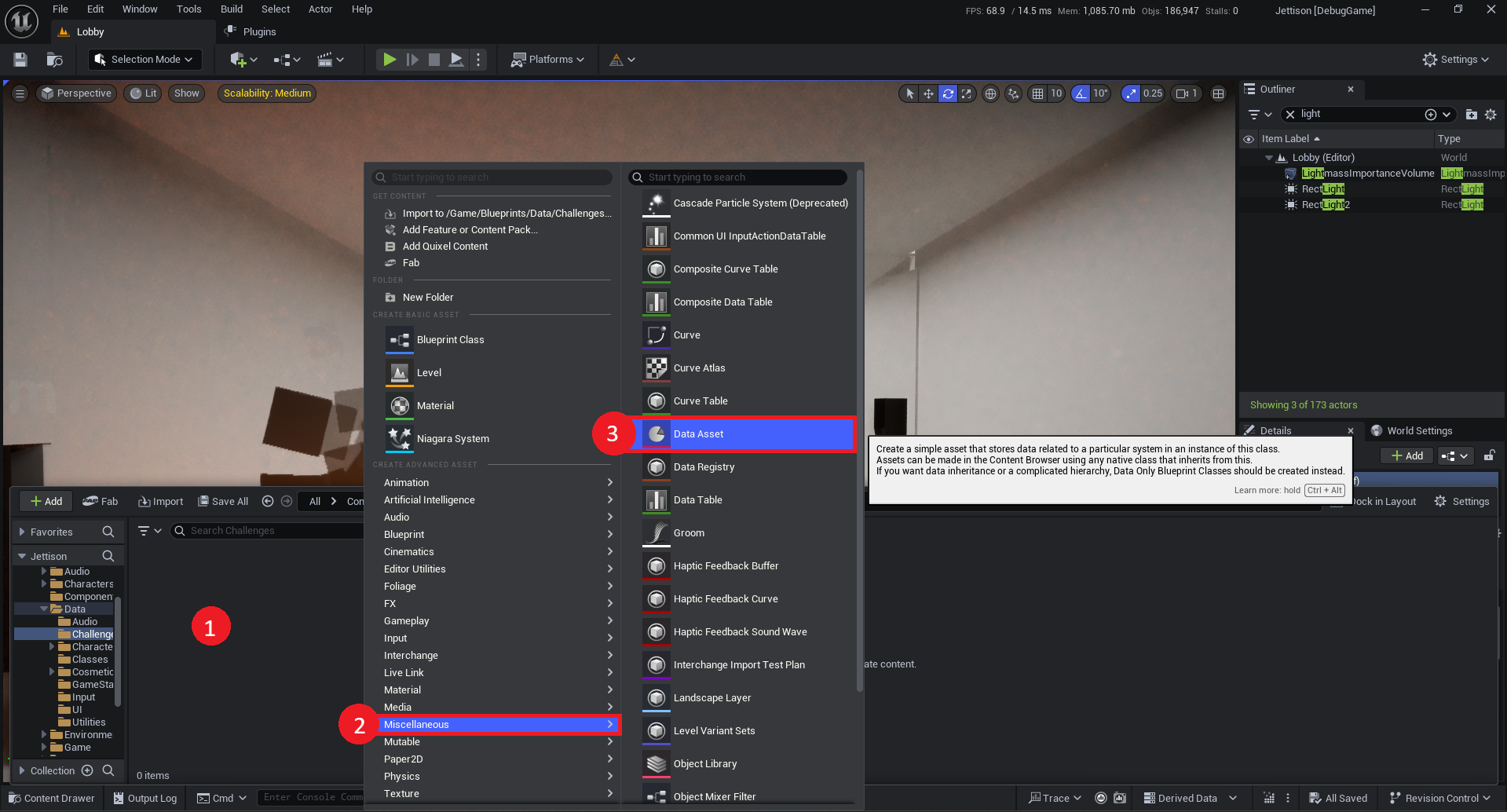
- Search For "Gateway Challenge Data"
- Select Gateway Challenge Data class.

Now, name the created file. (Typically something like DA_GatewayChallengeData.)
Before adding any challenges to the asset, We're going to add it to the global challenges asset list. This will add the challenges to the tracked list.
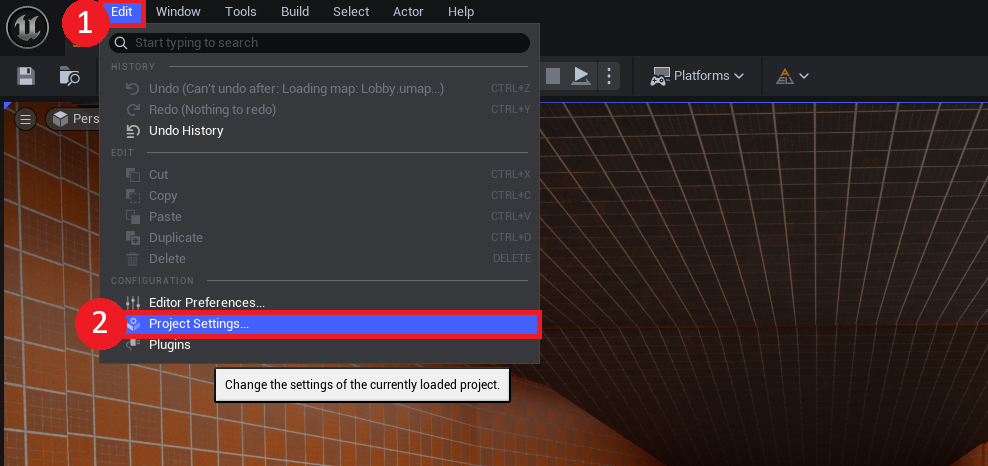
- Select "Edit" on the Toolbar
- Open "Project Settings"
- Scroll down to Plugins -> "NihiloFramework - Gateway"
- Add an element to "Challenge Definitions"
- Select your newly created Data Asset.
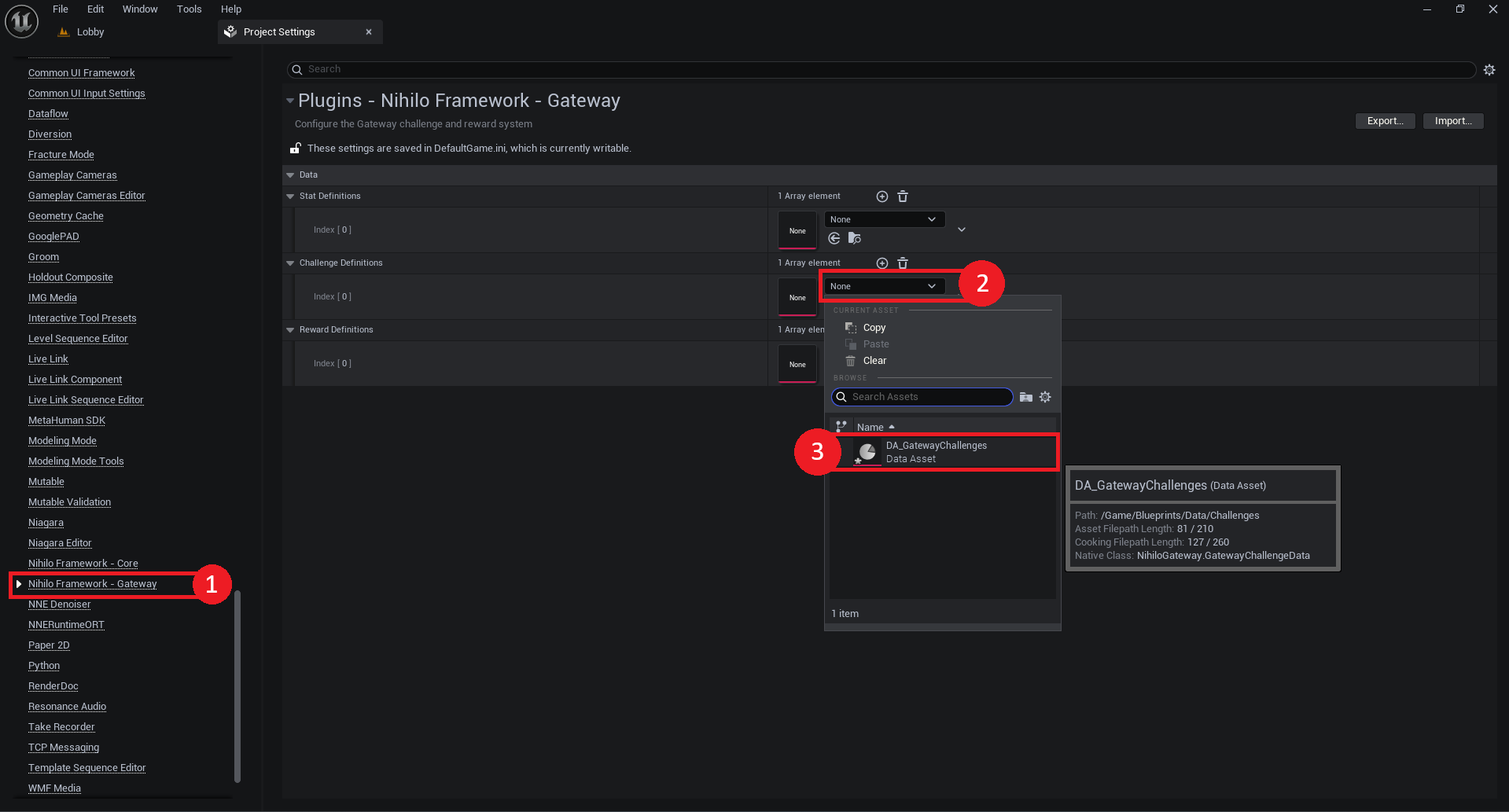
Adding Challenge Definitions
A new challenge definition will look something like this:
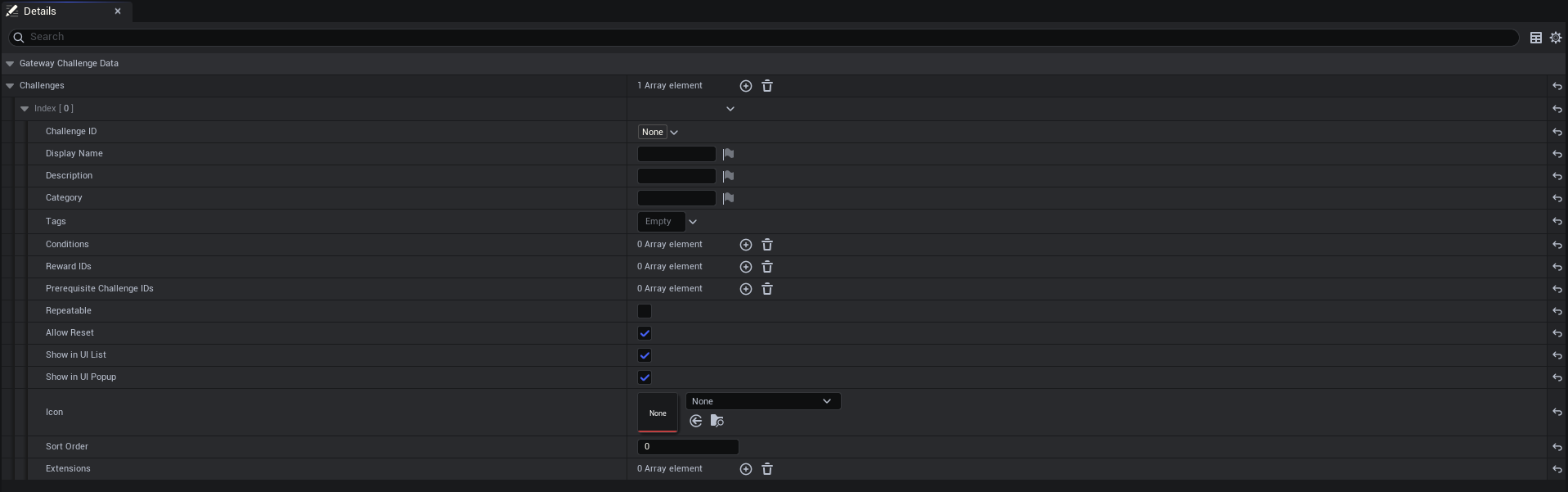
Let's walk through the fields of a challenge definition.
GatewayChallengeDefinition is the struct used to define a challenge's properties and behavior at design time. It does not contain any runtime state, such as progress or completion status.
Challenge Configuration
| Property | Description |
|---|---|
| Challenge ID | This is what other systems use to locate and operate on the challenge. It must be a unique, unused GameplayTag. Using a GameplayTag makes it far easier to reference in Blueprint and reduces bugs caused by typographical errors. |
| Display Name | The optional friendly name to be displayed in UI. |
| Description | The optional description to be displayed in UI. |
| Category | The optional category to be displayed in UI. Useful for grouping challenges into logical sections, such as "Combat", "Exploration", or "Social". |
| Tags | GameplayTags are the intended mechanism to filter bulk operations on challenges. For example, a tag like Gateway.Challenges.Persistence.Match allows you to call ResetAllChallengesWithTagForPlayer at the end of a match, resetting only the challenges relevant to that scope. |
| Conditions |
Conditions define the stat criteria that must be met for this challenge to be considered complete.
A challenge is completed when all of its conditions are satisfied. Multiple conditions allow you to compose
richer requirements, such as requiring a player to deal a certain amount of damage and win a match.
Milestones allow for a notification when a condition passes a particular threshold, without completion. Used for UI updates.
More details can be found in the Conditions section. |
| Reward IDs | A list of Gateway Reward IDs to grant when this challenge is completed. Rewards are resolved by their GameplayTag identifiers, allowing the challenge definition to remain decoupled from specific reward data. |
| Prerequisite Challenge IDs | A list of Challenge IDs that must be completed before this challenge becomes active. This allows you to build progression chains or unlock trees, where later challenges are gated behind earlier ones. |
| Repeatable | When enabled, this challenge can be completed more than once. After completion it will reset and become active again, allowing it to function as a recurring objective rather than a one-time milestone. |
| Allow Reset | During any operations attempting to reset this challenge, the system will first check whether the challenge allows resets. Disabling this protects completed challenges from being inadvertently cleared by bulk reset operations. |
| Show in UI List | Frequently, games will present a list of available challenges to the player. This provides an opportunity to exempt this challenge from such lists — useful for hidden or internal challenges. |
| Show in UI Popup | Frequently, games will show a popup when a challenge is completed. This provides an opportunity to exempt this challenge from triggering such popups. |
| Icon | An icon or image to display in UI. |
| Sort Order | Provides a manual method to control the display order of challenges within a list. |
| Extensions | Extensions are a modular method to augment a challenge's behavior.
For example, if you'd like to surface a completed challenge to an external achievement system such as Steam,
you can create a Blueprint challenge extension, hook onto the completion event, and dispatch whatever external
logic is needed.
That extension can then be freely reused across any challenge that should share the same behavior.
More details can be found below. |
Challenge Conditions
A challenge uses its conditions to determine whether it is complete.
Every time a stat referenced by a condition is updated, the challenge evaluates
whether all of its conditions are now satisfied — provided the challenge isn't already complete.
Stat ID
The GameplayTag identifying which stat this condition tracks. When that stat is updated,
this condition will re-evaluate against its target value.
Target Value
The value the stat must attain for this condition to be considered satisfied.
Whether the stat needs to equal, exceed, or fall below this value is determined by the Comparison Policy.
Milestones
Optional intermediate thresholds that trigger UI notifications before the condition is fully satisfied.
For example, a challenge requiring 100 kills could define milestones at 25, 50, and 75 to show progress popups along the way.
Like the target value, milestones are evaluated against the Comparison Policy.
Comparison Policy
The comparison operation used to evaluate the condition's current stat value against the target value.
The condition is satisfied when the comparison returns true.
| Comparison Policy | Description |
|---|---|
| Equal | The condition is satisfied when the stat value is exactly equal to the target value. Useful for challenges that require hitting a precise number, such as Reach Exactly Level 10. |
| Not Equal | The condition is satisfied when the stat value is anything other than the target value. Useful for detecting a state change away from a known value, such as confirming a flag is no longer at its default. |
| Greater Than | The condition is satisfied when the stat value strictly exceeds the target value. Useful for challenges like Deal More Than 10,000 Damage. |
| Greater Than or Equal | The condition is satisfied when the stat value meets or exceeds the target value. The most common policy for accumulation-based challenges, such as Earn 500 Kills or Complete 10 Matches. |
| Less Than | The condition is satisfied when the stat value is strictly below the target value. Useful for challenges that reward restraint or speed, such as Finish a Match With Fewer Than 3 Deaths. |
| Less Than or Equal | The condition is satisfied when the stat value is at or below the target value. A good fit for time-based challenges such as Complete the Level in 2 Minutes or Less. |
| Nearly Equal | The condition is satisfied when the stat value is within a small tolerance of the target value. Useful when floating-point precision makes exact equality unreliable, such as comparing a movement speed or a calculated ratio. |
| Not Nearly Equal | The condition is satisfied when the stat value falls outside the tolerance range around the target value. The inverse of Nearly Equal — useful for confirming a value has meaningfully diverged from a reference point. |
Completing Challenges
Challenge completion in Gateway happens automatically as stats update — no extra wiring required.
However, you can also complete a challenge manually via the Gateway Library Blueprint Function Library.
In any Blueprint, search for Gateway to browse the full API.
To complete a challenge manually, use CompleteChallengeForPlayer:

The equivalent C++ call:
cpp
UGatewayLibrary::CompleteChallengeForPlayer(WorldContextObject, PlayerState, ChallengeID);
Resetting Challenges
There are cases where resetting a challenge is useful — for example, clearing all match-scoped challenges at the start of a new match.
This can be done with ResetChallengeForPlayer, or for bulk resets by tag,
with ResetChallengesWithTagForPlayer.
Challenge Extensions
Challenge Extensions are a modular way to attach additional behavior to a challenge without modifying the core system.
They're defined per-challenge in the definition asset and can expose editable properties inline, making them easy to configure and reuse.
Creating a Challenge Extension
To create a challenge extension, create a Blueprint or C++ class inheriting from UGatewayChallengeExtension.
C++
cpp
ChallengeExtension_Example.h
#pragma once

#include "CoreMinimal.h"
#include "Data/Challenges/GatewayChallengeExtension.h"
#include "GatewayChallengeExtension_Custom.generated.h"

/**
 *
 */
UCLASS(BlueprintType, DisplayName="Custom Extension")
class JETTISON_API UGatewayChallengeExtension_Custom : public UGatewayChallengeExtension
{
	GENERATED_BODY()


public:
	virtual void HandleChallengeCompleted_Implementation(UGatewayComponent* GatewayComponent, const FGatewayChallenge& Challenge) override;
	virtual void HandleChallengeMilestoneCrossed_Implementation(UGatewayComponent* GatewayComponent, const FGatewayChallenge& Challenge) override;
	virtual void HandleChallengeReset_Implementation(UGatewayComponent* GatewayComponent, const FGatewayChallenge& Challenge) override;

	UPROPERTY(EditAnywhere, BlueprintReadWrite)
	bool InlineVariable = false;
};
cpp
ChallengeExtension_Example.cpp
#include "GatewayChallengeExtension_Custom.h"


void UGatewayChallengeExtension_Custom::HandleChallengeCompleted_Implementation(UGatewayComponent* GatewayComponent, const FGatewayChallenge& Challenge)
{
	Super::HandleChallengeCompleted_Implementation(GatewayComponent, Challenge);
}

void UGatewayChallengeExtension_Custom::HandleChallengeMilestoneCrossed_Implementation(UGatewayComponent* GatewayComponent, const FGatewayChallenge& Challenge)
{
	Super::HandleChallengeMilestoneCrossed_Implementation(GatewayComponent, Challenge);
}

void UGatewayChallengeExtension_Custom::HandleChallengeReset_Implementation(UGatewayComponent* GatewayComponent, const FGatewayChallenge& Challenge)
{
	Super::HandleChallengeReset_Implementation(GatewayComponent, Challenge);
}
Blueprint
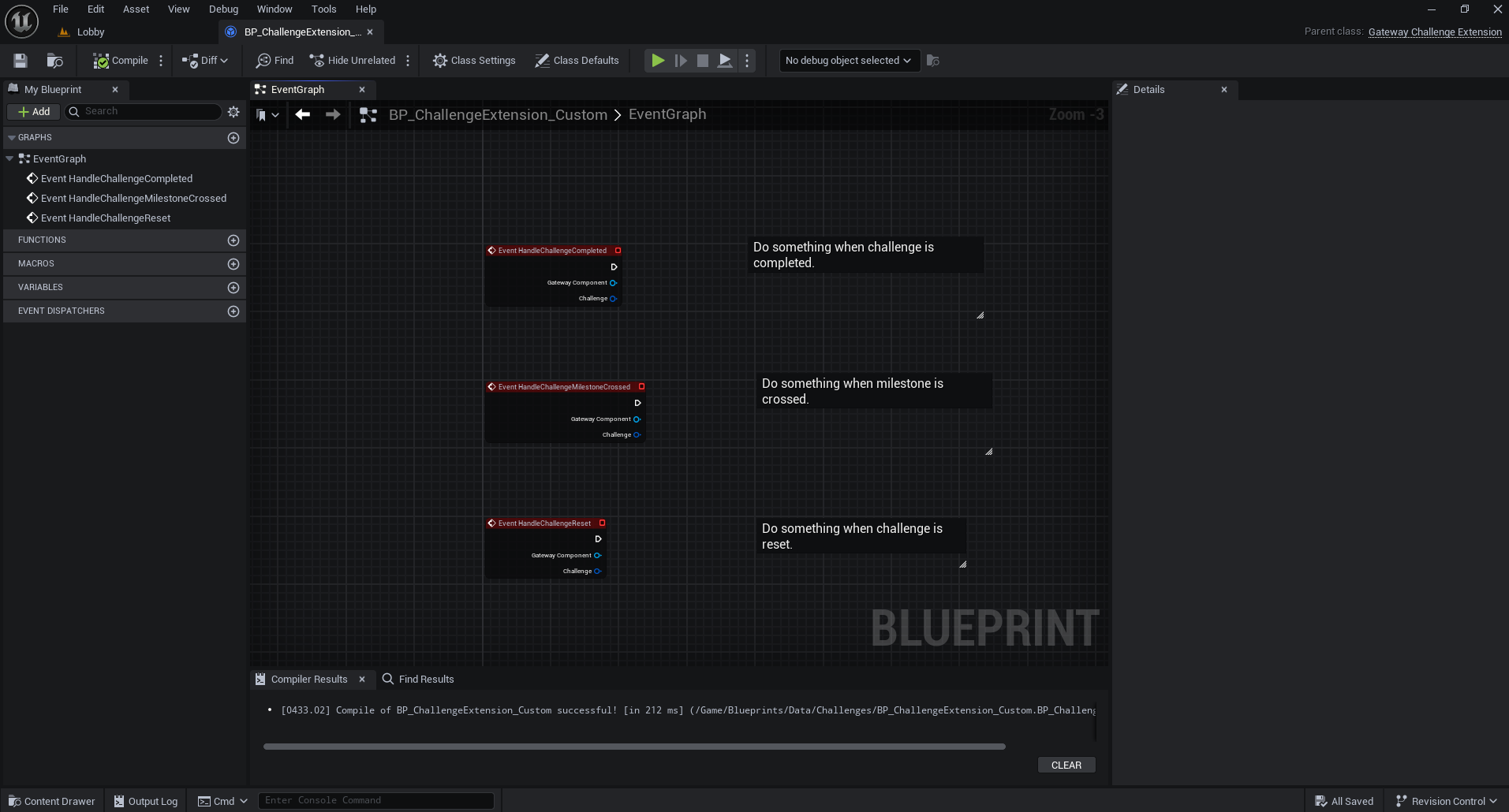
To expose a variable for editing directly on the challenge definition, enable Instance Editable on the variable in Blueprint,
or add the EditAnywhere specifier in C++.
To give the extension a clean display name in the editor, set the Display Name on the class.
Use Cases
Challenge Extensions are powerful any time you need behavior that runs alongside challenge completion. A few examples:
A SteamAchievement extension could be added to any challenge that should mirror progress to a Steam stat.
Expose the Steam stat name as an instance-editable variable, and update it the same way you normally would — reusable across any number of challenges.
A telemetry extension could forward completion events to an analytics backend without any coupling to the challenge definition itself.
A GAS extension could apply a GameplayEffect or grant an ability upon completion, keeping progression and ability systems loosely coupled.
For UI updates on challenge progress or completion, hooking onto events directly on the GatewayComponent is generally the better fit,
since it keeps UI concerns separate from the challenge data layer.
Challenge Struct
cpp
USTRUCT(BlueprintType)
struct NIHILOGATEWAY_API FGatewayChallenge : public FFastArraySerializerItem
{
	GENERATED_BODY()


    UPROPERTY(EditAnywhere, BlueprintReadWrite)
    FGameplayTag ID;


    // Info
    UPROPERTY(EditAnywhere, BlueprintReadWrite, Category = "Info")
    FText DisplayName;

    UPROPERTY(EditAnywhere, BlueprintReadWrite, Category = "Info")
    FText Description;

	UPROPERTY(EditAnywhere, BlueprintReadWrite, Category = "Info")
	FText Category;

	UPROPERTY(EditAnywhere, BlueprintReadWrite, Category = "Info")
	FGameplayTagContainer Tags;


	// Settings
	UPROPERTY(EditAnywhere, BlueprintReadWrite, Category = "Settings")
	TArray<FGatewayChallengeCondition> Conditions;

	UPROPERTY(EditAnywhere, BlueprintReadWrite, Category = "Settings")
	TArray<FGameplayTag> RewardIDs;

	UPROPERTY(EditAnywhere, BlueprintReadWrite, Category = "Settings")
	TArray<FGameplayTag> PrerequisiteChallengeIDs;

	UPROPERTY(EditAnywhere, BlueprintReadWrite, Category = "Settings", DisplayName="Repeatable")
	bool bRepeatable = false;

	UPROPERTY(EditAnywhere, BlueprintReadWrite, Category = "Settings", DisplayName="Allow Reset")
	bool bAllowReset = true;


	// UI
	UPROPERTY(EditAnywhere, BlueprintReadWrite, Category = "UI", meta=(DisplayName = "Show in UI List"))
	bool bShowInUIList;

	UPROPERTY(EditAnywhere, BlueprintReadWrite, Category = "UI", meta=(DisplayName = "Show in UI Popup"))
	bool bShowInUIPopup;

	UPROPERTY(Transient, EditAnywhere, BlueprintReadWrite, Category = "UI")
	TSoftObjectPtr<UTexture2D> Icon;

    UPROPERTY(EditAnywhere, BlueprintReadWrite, Category = "UI")
    int32 SortOrder = 0;


	// ProcGen
	UPROPERTY(BlueprintReadOnly, Category = "ProcGen")
	bool bProcedural;


	// Events
	UPROPERTY(VisibleAnywhere, BlueprintReadOnly, Category = "Events")
	int32 EventCounter = 0;

	UPROPERTY(VisibleAnywhere, BlueprintReadOnly, Category = "Events")
	FName LastEvent;


	// Values
	UPROPERTY(VisibleAnywhere, BlueprintReadOnly, Category = "Progress")
	bool bCompleted = false;

	UPROPERTY(VisibleAnywhere, BlueprintReadOnly, Category = "Progress")
	FDateTime CreatedTime = FDateTime::Now();

	UPROPERTY(VisibleAnywhere, BlueprintReadOnly, Category = "Progress")
	FDateTime CompletedTime;


	// Extension
	UPROPERTY(Transient, EditAnywhere, BlueprintReadWrite, Category = "Extension")
	TArray<TObjectPtr<UGatewayChallengeExtension>> Extensions;


	bool ResetValues();
	bool Complete();
	bool CheckCompletion(const TMap<FGameplayTag, FGatewayStat>& RelevantStats);
	bool CheckMilestoneCrossed(const TMap<FGameplayTag, FGatewayStat> RelevantStats, float& MilestoneValue);
	TArray<FGameplayTag> GetRelevantStatIDs() const;
	TArray<FGatewayStat*> GetRelevantStats(UGatewayComponent* GatewayComponent) const;
	void AddEvent(FName EventName);

    FGatewayChallenge()
    {
    	ID = FGameplayTag();
    	DisplayName = FText::GetEmpty();
    	Description = FText::GetEmpty();
    	Category = FText::GetEmpty();
    	bRepeatable = false;
    	SortOrder = 0;
    	bShowInUIList = true;
    	bShowInUIPopup = true;
    	bProcedural = false;
    }

	bool operator==(const FGatewayChallenge& Other) const
    {
    	return ID == Other.ID;
    }
};